Open attempts
The Open attempts tab is the first place to look when someone says "my card did not work". It lists every card scan or typed ID at a station, and what the system did.
The records are kept for 30 days by default.
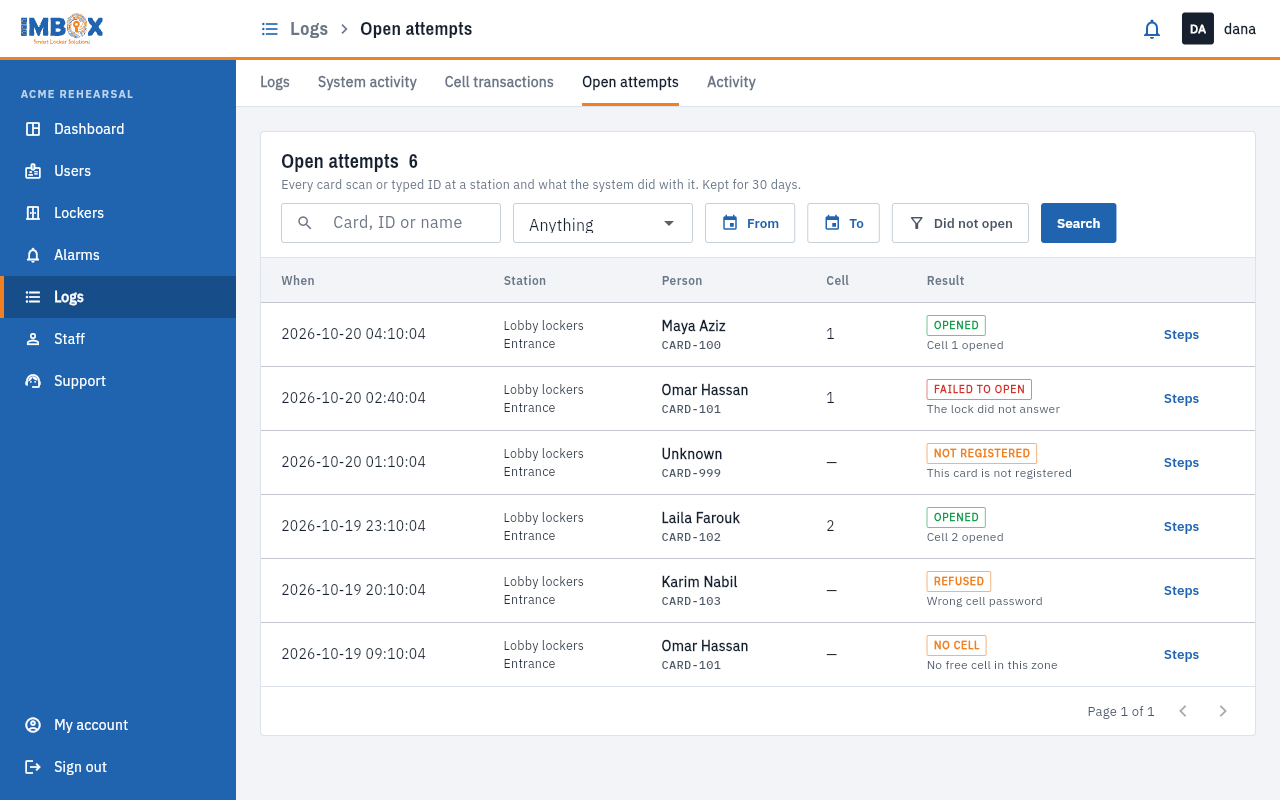
Find an attempt
- Type part of a card number, an ID or a name in the search box.
- Choose a result in the drop-down: Anything, Opened, Failed to open, Refused, Not registered or No cell.
- Choose From and To dates, or switch on Did not open to see only the attempts that failed.
- Press Search.
Read a row
| Column | Meaning |
|---|---|
| When | The time of the scan. |
| Station | The locker station and zone. |
| Person | The name, with the card number under it. A card the system does not know shows as Unknown. |
| Cell | The cell that was opened, if any. |
| Result | What happened, with a short sentence. |
The results
| Result | Meaning | What to do |
|---|---|---|
| Opened | The cell opened. | Nothing. |
| Failed to open | The system tried and the lock did not answer. | See Failed to open. |
| Refused | The scan was understood but not allowed. | Read the sentence beside it. |
| Not registered | The card or ID is not known at this station. | Add the person, or correct the card number. |
| No cell | The person has no cell, or no cell was free. | Give the person a cell, or free one. |
| Cell is elsewhere | The person's cell is at another station or zone. | Tell them where it is. |
See exactly what happened
Press Steps on a row. A box opens with every step the system took, one under another, with how many milliseconds each one took. A red line shows the step that went wrong.
Common questions
- "The card is not registered." Check the number in Users. A typing mistake in the card ID is the usual reason.
- "No free cell." Every cell in the zone is taken. See Shared or permanent cells.
- "The lock did not answer." See the cell's alarms, and report the cell to Support if it repeats.