Finding your way
The screen
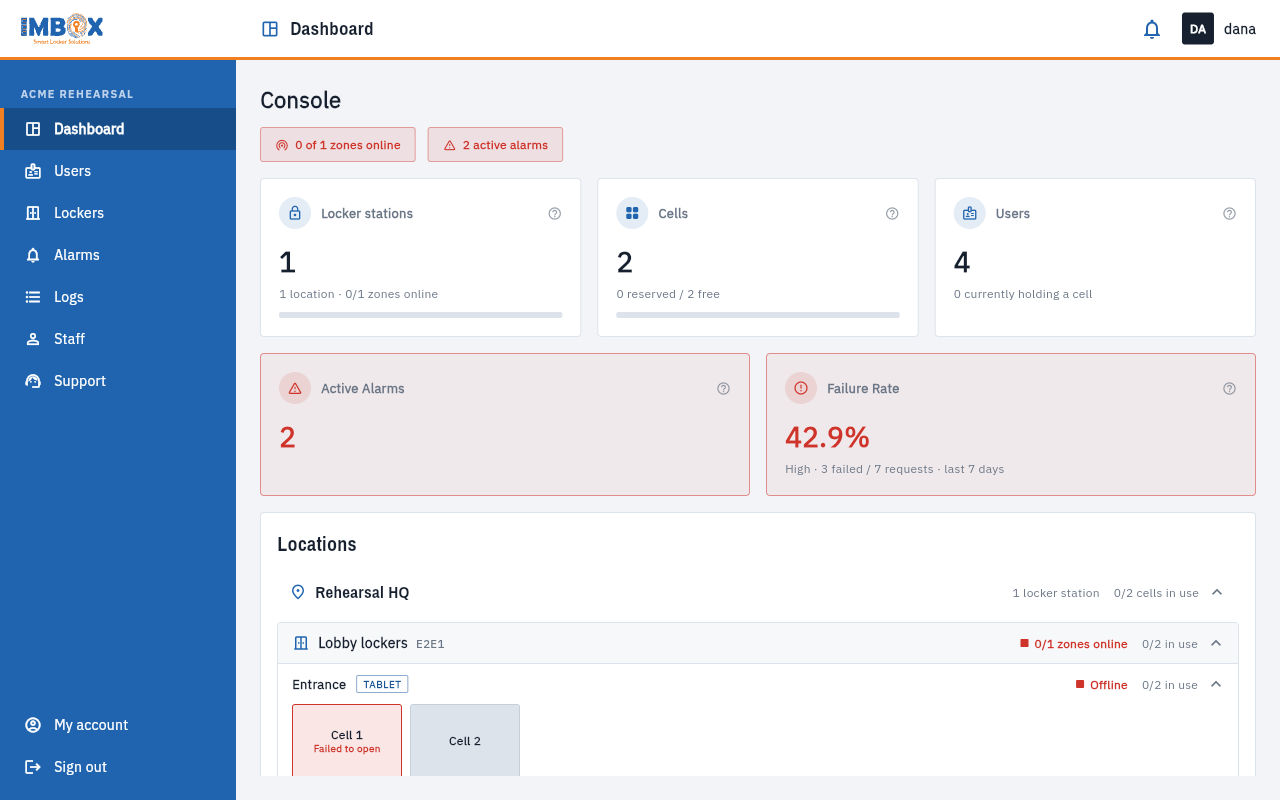
- The blue menu on the left lists the sections your role may use: Dashboard, Users, Lockers, Alarms, Logs, Staff and Support. The open section is highlighted. At the bottom are My account and Sign out.
- The header shows where you are, the notification bell and your initials.
- The tabs under the header move between the pages of one section. For example, Users has All users, Add user and Manage users.
On a phone
On a narrow screen the menu hides behind the three lines at the top left. Tables turn into cards, one card per row, with the most important facts first. Everything you can do on a computer you can do on a phone.
The bell
The bell shows what happened: new alarms, and answers to the issues you reported. See Notifications.
Locations in the lists
Many pages let you narrow a list. Look for a search box, a drop-down and date buttons at the top of the list. The same filters appear in the same place on every page.
If you cannot find a page
The menu only shows what your role may use. If a page is missing, ask your Owner, or read Roles and what they can do.